🔥 Limited-Time PromotionRemaining 30d 01:47:57Ends Jul 31, 2026 23:59 — subscribe now to lock in the promotional price!
Let developers no longer fear multilingual, more focused immersive coding

Focused on solving programmers' most common language barriers

Translate Pro is a translation plugin designed for coding, technical reading and troubleshooting scenarios, helping developers understand information more efficiently, locate problems and maintain an immersive development experience.

Download Now View Feature Highlights Supports Google, Azure, Amazon, Baidu, DeepL, OpenAI, Tencent, CustomEngine

6,848+

Plugin Installs

5.0

Marketplace Rating

1.3.0

Latest Version

8+

Integrated Engines

GoogleAzureAmazonBaiduDeepLOpenAITencentCustomEngine

Product Overview

Translation plugin for coding, reading and troubleshooting scenarios

Focused on the most common cross-language understanding needs in development, providing more efficient and consistent translation support for coding, technical reading and troubleshooting scenarios.

Instant Understanding of High-frequency Scenarios

Provides instant translation for code comments, API documentation, error messages and other high-frequency developer reading content, reducing the cost of switching between the editor and external tools.

Code CommentsError MessagesInstant Understanding

Multi-engine and Configuration Flexibility

Supports multiple translation engines and custom engine configurations, making it easy for individual users, team users and different business scenarios to establish more suitable translation strategies.

Multi-engineCustom ConfigStrategy Switch

Continuous Evolution and Capability Expansion

Covers capabilities including plugin detail immersive translation, terminal translation and multi-engine configuration, forming more complete development scenario translation support.

Terminal TranslationCapability ExpansionContinuous Iteration

Core Features

Covering core translation scenarios in the development workflow

Targeting the most common cross-language understanding scenarios for developers, directly demonstrating the plugin's value in coding, reading and troubleshooting workflows.

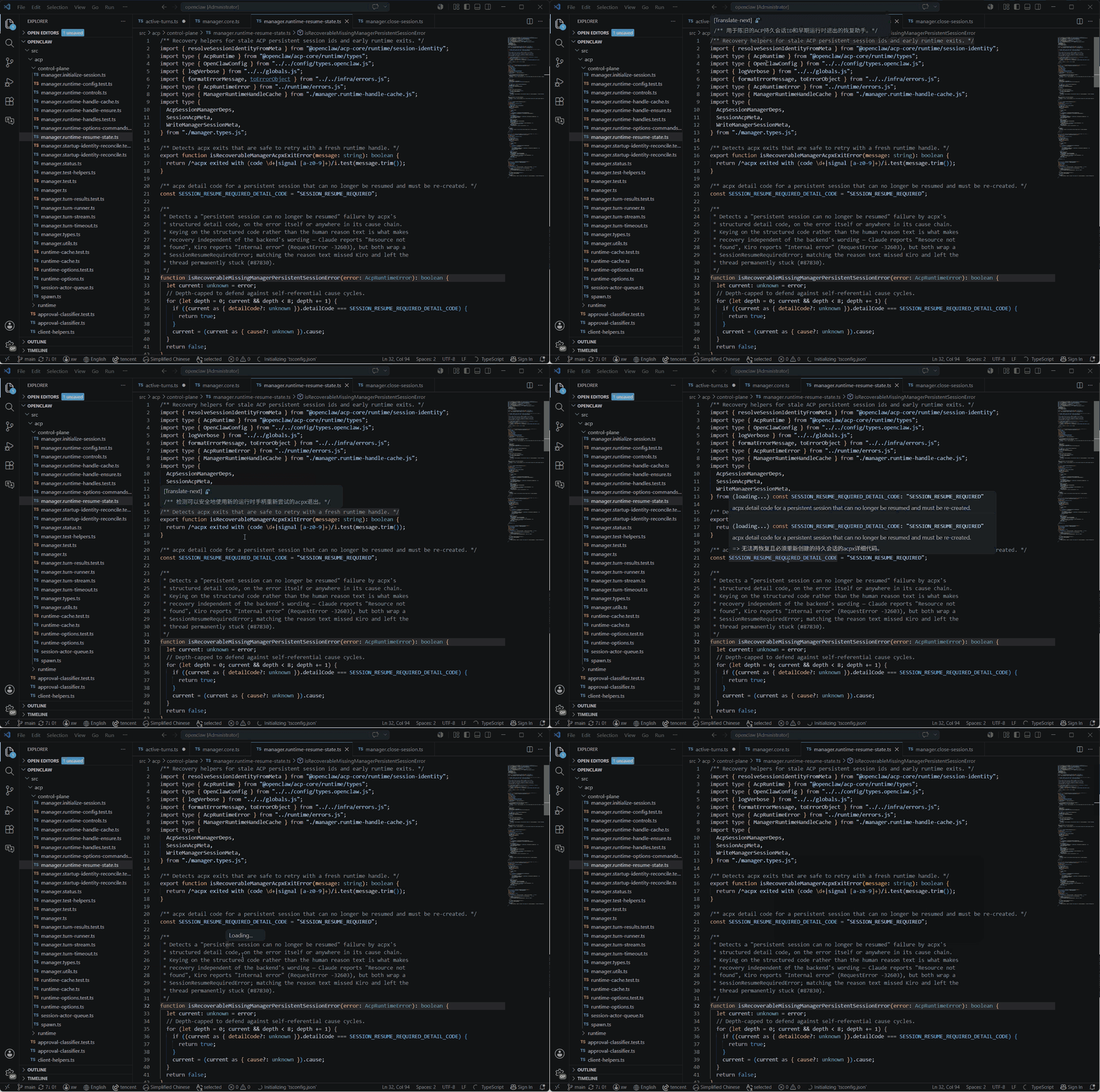
01 Hover Translation

Hover Translation

Covers code comments, API documentation, error prompts and other high-frequency reading content, allowing developers to quickly understand within the editor.

  • Supports hover comment translation, making it easier to read source code and third-party library documentation.
  • Supports hover error translation, no need to copy to an external translator when encountering error messages.
  • Lightweight trigger, lightweight close, minimizing interruption to your current editing rhythm.

Hover Comment / Error Translation

Put the most common instant understanding scenarios at the first priority

Comment TranslationError TranslationLow InterruptionInstant View
Hover Translation GIF
02 Immersive Detail

Plugin Detail Immersive Translation

Designed for long-content reading scenarios like plugin introductions, installation instructions and configuration documentation, helping users maintain continuous understanding.

  • Targeted at the VS Code plugin ecosystem, directly corresponding to real developer usage scenarios.
  • Suitable for reading lengthy plugin descriptions, installation documentation and configuration guides.
  • Lets users perceive that the product is not just 'translating a sentence', but serving the entire reading process.

Plugin Detail Immersive Translation

Maintain immersive understanding during long-content reading

Immersive Mode
Long-form ReadingPlugin DetailsImmersive Understanding
Plugin Detail Immersive Translation
03 Markdown Preview Translation

Markdown Preview Immersive Translation

Designed for markdown file reading scenarios, helping users maintain continuous understanding.

  • Targeted at the VS Code plugin ecosystem, directly corresponding to real developer usage scenarios.
  • Lets users perceive that the product is not just 'translating a sentence', but serving the entire reading process.

Markdown Preview Immersive Translation

Maintain immersive understanding during long-content reading

Long-form ReadingImmersive Understanding
Markdown Preview Translation GIF
04 Terminal Translation

Terminal Text Translation

Supports translation of terminal logs, command output and build errors, helping developers locate and resolve problems faster.

  • Directly handles English content in build logs, CLI output and installation errors.
  • Provides a consistent translation experience in terminal and editor workflows.
  • More friendly for onboarding, cross-language collaboration and complex dependency debugging.

Terminal Selected Text Translation

When you can't understand the log, translate it directly in the terminal

Ctrl + Alt + `
CLI LogsBuild ErrorsTerminal Workflow
Terminal Translation GIF
05 Selected Translation

Selected Text Translation

Suitable for quick translation of code comments, API document fragments and local description text, reducing the operational cost of copying to external tools.

  • Suitable for quickly handling code comments, API document fragments and local description text.
  • Supports replacement translation, able to directly match content processing actions in the editor.
  • Reduces the switching cost of copying and pasting to external tools.

Selected Text Translation

Select to translate in the editor, keep the flow uninterrupted

Shift + Alt + T
Select to TranslateReplace TranslationFinish in Editor
Selected Text Translation GIF
06 Engine Support

Support Multi-engine and Custom Translation Engine

Supports multiple translation engines and custom engine configurations, meeting the translation needs of different teams, projects and workflows.

  • Supports Google, Azure, Amazon, Baidu, DeepL, OpenAI, Tencent and other engines.
  • Supports custom translation engines, suitable for more professional or personalized workflows.
  • Leaves expansion space for future membership features, team configurations and advanced scenarios.

Multi-engine / Custom Engine Configuration

Extend translation from 'usable' to 'configurable'

Alt + Shift + E
Multi-engineCustomEngineCustom EngineAdvanced Config
Multi-engine and Custom Engine GIF

Membership

Unlock more complete translation capabilities and priority experience

The membership system focuses on more complete translation capabilities and a higher priority product experience, including earlier access to new features, priority experience with more translation engine capabilities, and receiving version update and advanced capability notifications.

Translate Pro

VS Code translation plugin for developers, focused on coding, reading and troubleshooting scenarios, helping users complete understanding, translation and processing in a unified workflow.

Contact WeChat: aa4790139

Contact Email: aa4790139@hotmail.com

Community Videos: bilibili / Let Freedom Code

GitHub: yxw007/vscode-translate-next

Copyright © 2026 Translate Pro. All rights reserved.